
Territory planning for food and drink sales teams
Sales territory planning is deciding which outlets each rep covers, how often, and in what order, and Dashmote puts the 20M+ bars, restaurants, cafes and hotels it tracks in 60+ countries on one map. Assign outlets to reps by area, postcode or channel. Your CRM knows your accounts; this shows the rest of the territory, with AI scoring each outlet on fit from its menu, photos and delivery listings.
The trusted intelligence layer for teams selling to Hospitality & Retail








How to develop a territory sales plan in five steps
- Size the universe. Count the outlets in the territory that fit your range: the right channels, venue types, cuisines and price levels. This is the number your plan is built on.
- Split known from unknown. Match your CRM against that universe. You get three groups: current accounts, lapsed accounts, and fitting outlets you have never served (your whitespace).
- Tier every outlet. Score each one on fit and potential and put it in band A, B or C. Current accounts get a tier too, so a small account with high potential is not treated like a small account with none.
- Set a visit rhythm per tier. For example: A accounts every two weeks, B accounts monthly, C by phone or through the wholesaler. Pick the rhythm that matches your visit capacity.
- Build the weekly visit list, then review monthly. Fill each week from the top of each tier, group visits by area, and move outlets between tiers as menus, openings and closures change.
How do I prioritise accounts in my territory?
Prioritise on two axes: what an outlet is worth to you today, and what it could be worth. The grid tells you what to do with each.
| Low potential | High potential | |
|---|---|---|
| Current account | Keep it served, at lower cost | Grow it: more lines, more visits |
| Not an account yet | Leave it, or cover it remotely | Win it: this is where new visits go |
Most territories over-visit the top-left box out of habit. Outlet data makes the bottom-right box visible: venues that fit your brand, list a competitor or miss your category, and have never seen a rep from your company.
The Monday visit list: worked example
Take a rep covering one city district who plans the week.
- Cocktail bar, tier A, not an account. Lists a rival gin in two signature drinks. Pitch: a switch on the signature serve. Visit before the evening shift.
- Gastropub, tier A, current account. Added a new food menu last month. Pitch: extend the range to match.
- Italian restaurant, tier A, not an account. No alcohol-free options on the menu, a big lunch trade. Pitch: an alcohol-free listing.
- Hotel bar, tier B, lapsed account. Last order months ago, still lists the rep's brand on its website menu. Check why orders stopped.
- New opening, tier B, not an account. Opened recently, independent, same street as the cocktail bar. Visit while the range is still being set.
- Pub, managed group. Not a rep visit: flagged for the key account manager who talks to the group.
Each rep gets a list like this for the week, with a short brief per venue, so the time goes to owners rather than research.
CRM or planning app versus outlet data: what each gives you
A CRM and a planning app are not the problem; they are fed the wrong input. They can only plan the outlets someone already typed in.
| Your CRM | A planning app | Outlet data (DashLeads) | |
|---|---|---|---|
| Knows | Your accounts, orders, visit history | The best order for the stops you give it | All mapped outlets in the territory, account or not |
| Answers | What did we sell, to whom? | In what order do I visit them? | Which outlets should be on the list at all? |
| Misses | Venues you never served | Venues not on your list | Your order history |
DashLeads does not replace your CRM. Scored outlets go into it by CSV or API export, CRM matching marks the accounts you already have, and the optional field module adds daily visit plans on the rep's phone.

Whitespace: where your territory is still empty
Planning is also about where things will happen next. In our Amsterdam study, we followed ten chains across 18 neighbourhoods. De Pijp had nine of the ten; Bos en Lommer and the Dapperbuurt had one each (Amsterdam on repeat, 22 September 2026).
For a rep, the dense areas are where you defend accounts, and the near-empty ones are where the next openings may land. Seeing both on one map lets you plan visits for the territory you will have next quarter, not only the one you have today.
Frequently asked questions
How to develop a territory sales plan?
To develop a territory sales plan, size the universe of outlets that fit your range, match it against your CRM to separate accounts from whitespace, tier every outlet by fit and potential, set a visit rhythm per tier, and build weekly visit lists that you review every month.
What do territory sales reps do?
Territory sales reps own the accounts and the new business in a defined area: they visit outlets, grow existing accounts, win new listings, check how products are presented, and report what they see back to the business.
Is there a free app to plan sales visits?
Yes, free planners exist, including multi-stop directions in common map apps, but they only order the stops you give them. They do not tell you which outlets belong on the list, which is the part outlet data adds.
What is the best app for field sales?
There is no single best app: for beverage and foodservice reps the best set-up is the CRM or planning app your team already uses, fed with outlet data that tells it which venues to visit and why.
How many accounts should a rep cover?
A rep should cover as many accounts as their selling hours allow at the visit rhythm each tier needs. Divide weekly selling hours by the average visit plus travel time to get weekly slots, then fill those slots by tier, with A accounts first.
Does it work with my CRM?
Yes: you can upload your account list for CRM matching, and scored outlets go back into your CRM through CSV or API export, so reps keep working in the tools they know.
Related reading
For sales leaders: the business case
Territory design is usually done once a year on CRM history. Outlet data lets you do it on the actual market.
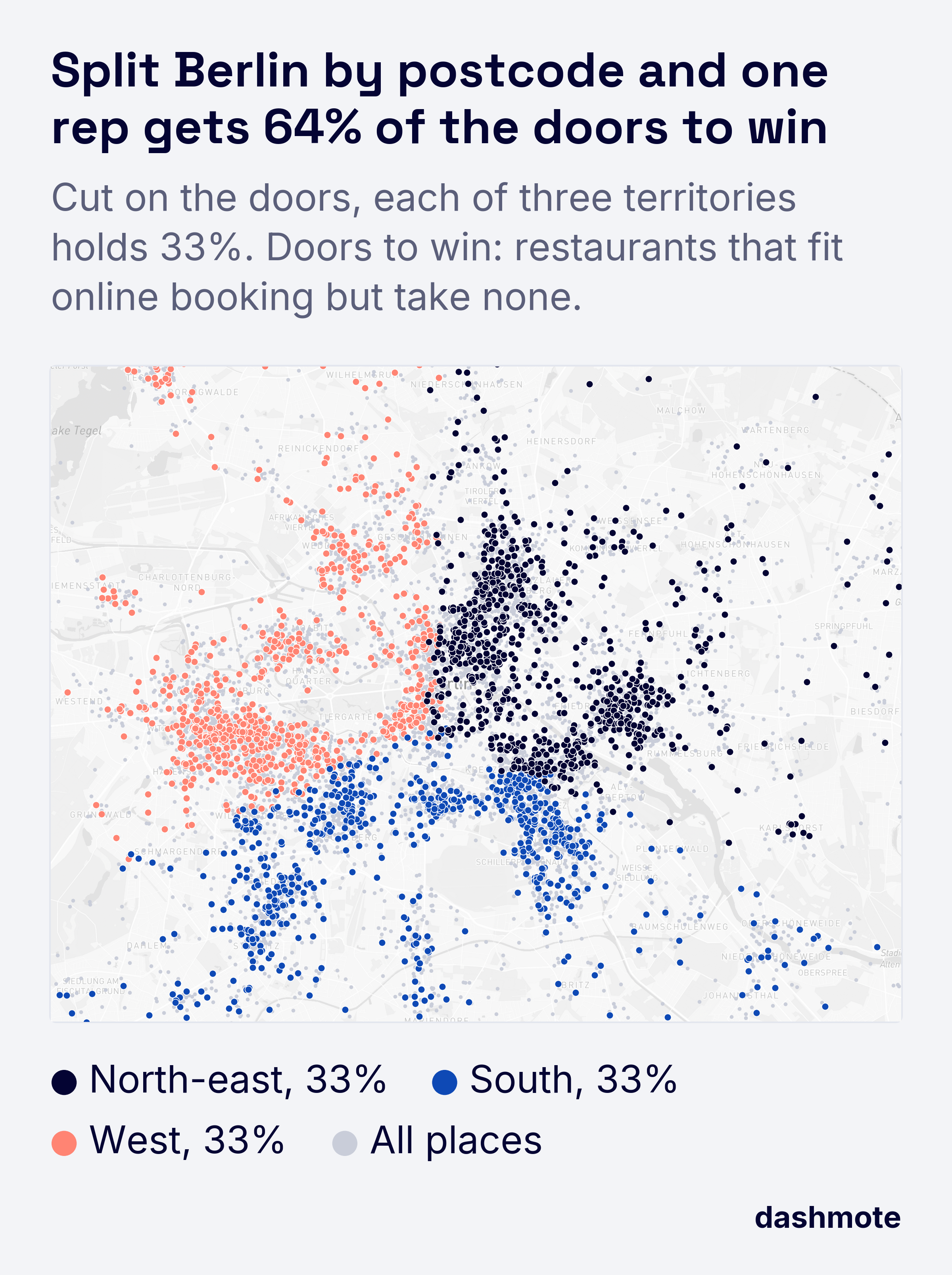
- Fair, comparable territories. Balance territories on the number of fitting outlets and their potential, not on postcode counts or legacy account lists.
- Capacity where it pays. See how many visits go to low-potential accounts and move them to the outlets you could win.
- One plan from head office to the rep's phone. The same scored outlets feed the territory plan, the CRM and the daily visit plan, with delivery listings on the same record (food delivery insights). See pricing for territory and per-user options.