
CRM account matching: every account linked to its outlet
CRM account matching links each account in your customer list to its outlet record, against 20M+ venues in 60+ countries. Upload your list and see, territory by territory, which fitting outlets you already serve and which are the accounts missing from your CRM: the new doors where you can win next. You review the proposed matches and commit, and unmatched rows are kept.
The trusted intelligence layer for teams selling to Hospitality & Retail









Which outlets in my territory are already customers?
Every field team has a customer list. It lives in the CRM, the distributor's sales file or a spreadsheet, and it knows who you sell to. What it does not know is everything else: the bars, restaurants and cafes in the same streets that you do not serve yet.
Outlet data has the opposite problem. It shows the whole market but not which venues are already yours. Put the two side by side without linking them and a rep gets prospect lists full of current customers, and a manager cannot say how much of a territory is still open.
Account matching joins the two. Once your accounts are linked to their outlet records, every list, map and score knows which doors are already yours.
What you upload and what you get back
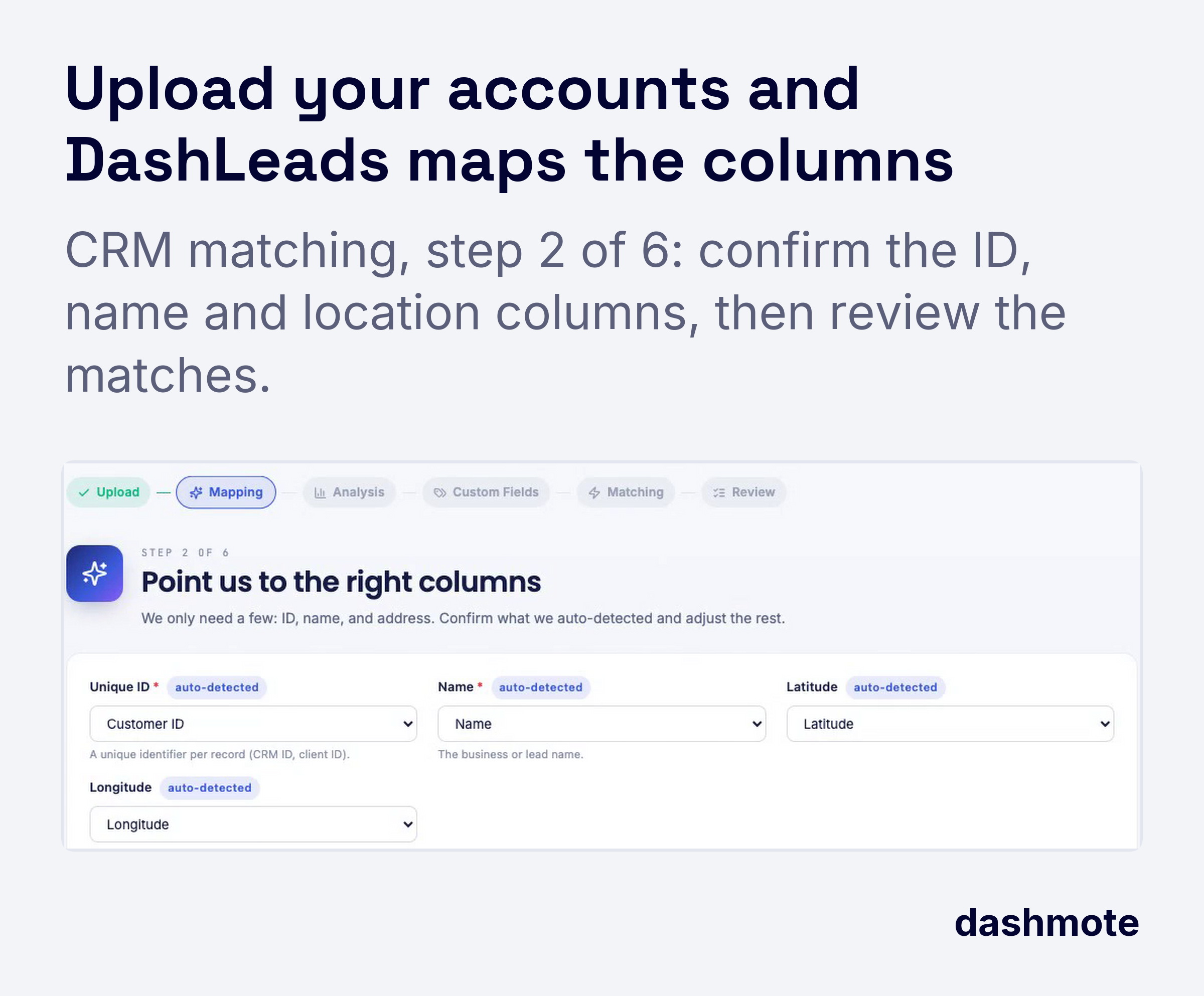
The upload is a plain file from your CRM or sales system. The more columns you include, the easier the review.
| Column | Needed? | Example |
|---|---|---|
| Your account ID | Yes | ACC-10442 |
| Account name | Yes | Corner Cafe |
| Street address and postcode | Yes | 12 Market Street, 1000 AB |
| City | Yes | Amsterdam |
| Coordinates | Optional | Helps where addresses are vague |
| Your own fields | Optional | Tier, rep, last order date |
Each row comes back in one of three states:
- Matched: linked to one outlet record, ready to commit.
- To review: a proposed outlet you confirm, change or reject.
- Unmatched: kept, not dropped. It stays in your list for later, for example a venue that has just opened or a row with an incomplete address.
Nothing is linked until you commit it, and your account IDs travel with the outlet, so exports go back into the CRM cleanly.
Current accounts versus new doors on one map
After the commit, DashLeads separates every list into two groups: current accounts and new doors.
- For the rep: prospect lists and lead scores skip current customers, so visit time goes to venues that do not buy from you yet. Current accounts stay visible on the map as rings, so a new door next to a loyal customer is easy to add to the same day's visits.
- For the manager: each territory shows its outlets, its current accounts and the white space between them, by channel and by segment.
- For the account review: your matched customers inherit the full outlet record: menu brands, reviews and operator. A customer whose menu now lists a competitor shows up before the next order is lost.
Worked example: 400 accounts in one city
Take a beverage distributor that uploads 400 on-premise accounts for one city.
| Step | Result |
|---|---|
| Matched automatically | 78% of accounts |
| Reviewed and confirmed | 10% of accounts |
| Unmatched, kept for later | 13% of accounts (mostly incomplete addresses) |
| Outlets in the city that fit the target segments | 2,900 |
| Current accounts among them | 350 |
| New doors | 2,550 |
In one city district the picture is sharper: 180 fitting outlets, 22 current accounts. Next week's visit list starts with the top-scored new doors in that district, two of them next door to existing customers.
What a match can and cannot show
A match says that your account and an outlet record are the same venue. Accounts that stayed unmatched, and venues you serve through a wholesaler you do not see, are not counted in your share of a territory. Re-upload the list after big CRM clean-ups so the picture follows your customer base.
Frequently asked questions
What is CRM account matching?
CRM account matching is linking each account in your customer list to the outlet record of the same venue, so your current customers appear inside the market data and every list separates customers from new doors.
What do I need to upload?
You need an account ID, a name, a street address with postcode and a city for each account. Coordinates and your own fields such as tier or rep are optional and travel with the match.
What happens to rows that do not match?
Unmatched rows are kept, not deleted. They stay in your list so you can complete the address or match them later, for example once a new venue appears in the outlet data.
Can I check the matches before they are used?
Yes, nothing is linked until you commit it. Proposed matches wait for your review, and you can accept, choose another outlet or keep a row unmatched.
How do I find new doors in my territory?
After matching, filter a territory on your target segments and exclude current accounts: what remains is your white space, ranked by lead score, a score from 0 to 100 against the account you describe.
Can I send the result back to my CRM?
Yes, exports carry your own account ID next to the outlet data, so new doors and enriched current accounts load back into the CRM without re-keying.
Related reading
For sales leaders: the business case
Matching your accounts once turns market data into a view of your own business inside that market.
- Open doors per territory. You see how many fitting outlets each territory still has untouched, so targets follow opportunity, not last year's numbers.
- No wasted prospecting. Reps stop visiting venues that already buy from you as if they were new leads.
- Early warning on current accounts. Matched customers carry the full outlet record, so a competitor appearing on a customer's menu is visible to the team.